
How to invite families
How do I invite families to join my SafeTeam program?
Use the Invites tab inside your program to invite athletes and households into SafeTeam. You can send invites by link, email, phone, QR code, or spreadsheet upload.
Before you start
Make sure you are logged in at app.safeteam.io with your coach account and that you have opened the correct program and season.
Invite families from your program
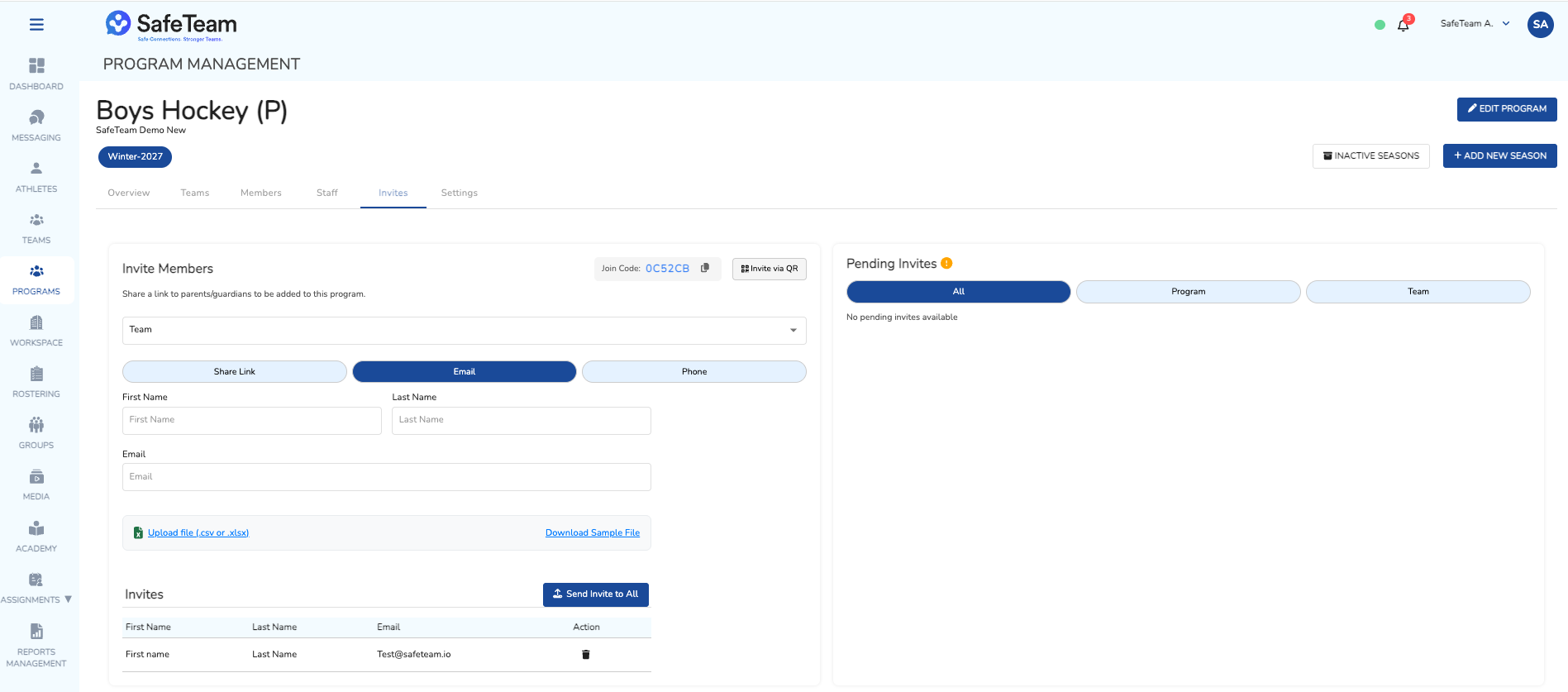
- In the left menu, open Programs.
- Select the program you want to manage.
- Open the Invites tab.
- Choose whether the invite should be for the full program or a specific team, if your program uses teams.
- Select an invite method:
- Share Link
- Phone
- Invite via QR
- CSV/XLSX upload
Sending email or phone invites
For email or phone invites:
- Enter the family contact information.
- Click the + button to add each invite to the invite pool.
- Review the invite pool for accuracy.
- Click Send Invite to All when you are ready to send the invites.
Review pending invites
Use Pending Invites to see outstanding invitations. From there, you can review, resend, or delete invites that have not been accepted yet.
Tip
Your program can operate as the team when you are getting started. You only need to create separate teams if you need separate rosters, coaches, or join codes.
Need help?
Visit info.safeteam.io for FAQs and walkthroughs, email support@safeteam.io, or text 763-777-7279.