
How do I use a join code?
First, if you already have an account and you are logged in, you need to log out to get to the "join a new team" flow. Use the join flow and enter the program or team join code provided by the coach/admin. Program join codes connect you to the program; team join codes target one specific team, but will then also roster you to the program level. Also, when choosing the "route" in the join flow, select "I am a parent/guardian" to continue to the household join flow. Only choose "I am an athlete" if you are a student athlete. Only one route should be used to connect your household to the program/team. If both you and your athlete use the route you can get an error that the email already exists.
Using a join code
- Log out if you're currently logged in.
- Enter the join flow.
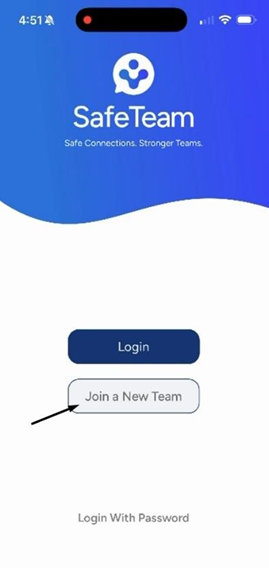
- Enter the program or team join code provided by the coach/admin:
- Program join code – connects you to the program.
- Team join code – targets one specific team, and also rosters you to the program level.
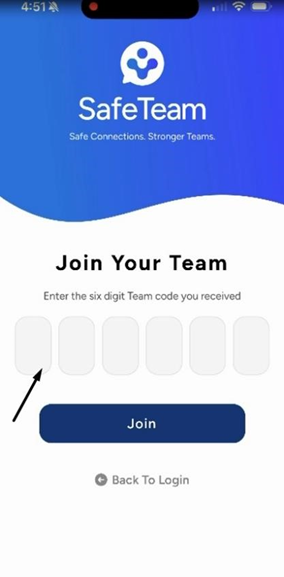
- When choosing your route:
- Select "I am a parent/guardian" to continue to the household join flow.
- Only select "I am an athlete" if you are a student athlete.
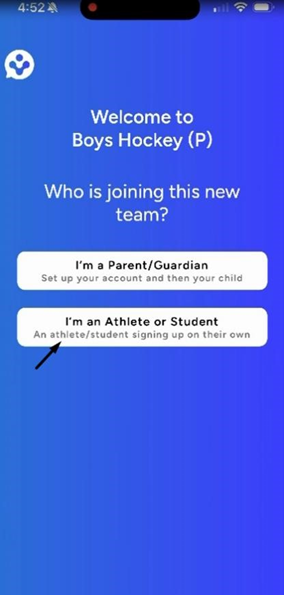
Important
- Only one route should be used to connect your household to the program/team.
- If both you and your athlete use the same route, you may get an error that the email already exists.
Need help?
Visit info.safeteam.io for FAQs and walkthroughs, email support@safeteam.io, or text 763-777-7279.